How to add a DMARC record in cPanel Zone Editor
DMARC is a DNS record that tells receiving mail servers what to do with messages that claim to come from your domain but fail SPF or DKIM checks. Having it set up helps your legitimate email reach the inbox and makes it harder for someone to spoof your domain.
In this guide you’ll check whether your domain already has DMARC and then add or update the TXT record from Zone Editor in cPanel.
Before you start
- Your domain must use cPanel’s DNS for your account. If your DNS is hosted elsewhere (for example Cloudflare or your registrar), add the same value in that panel or contact support.
- You should already have SPF and DKIM set up, because DMARC builds on those two checks.
- You need a mailbox you control so you can receive the DMARC reports.
- Check whether your domain already has a DMARC record, so you don’t create a duplicate.
Open Zone Editor
- Log in to cPanel.
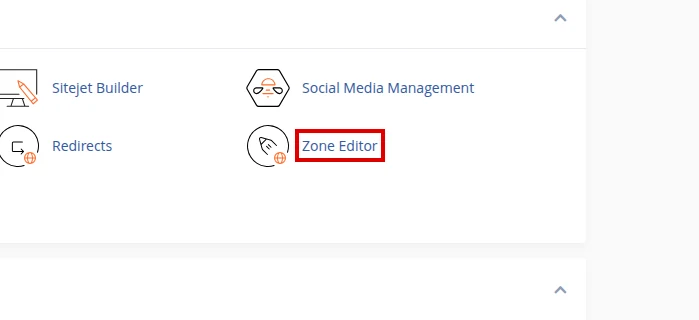
- In the Domains section, open Zone Editor.
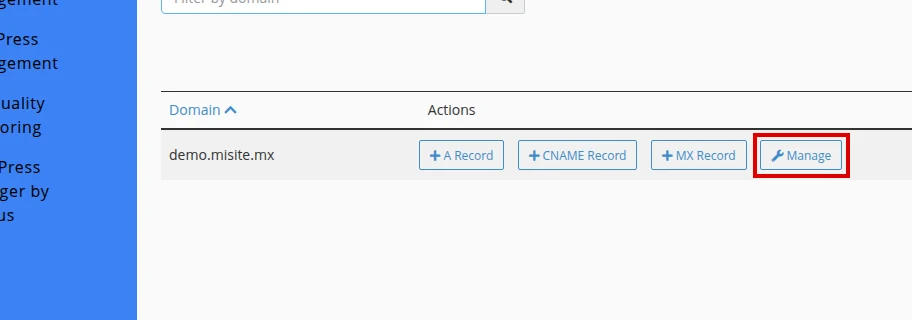
- Find your domain in the list and click Manage.
Check whether DMARC already exists
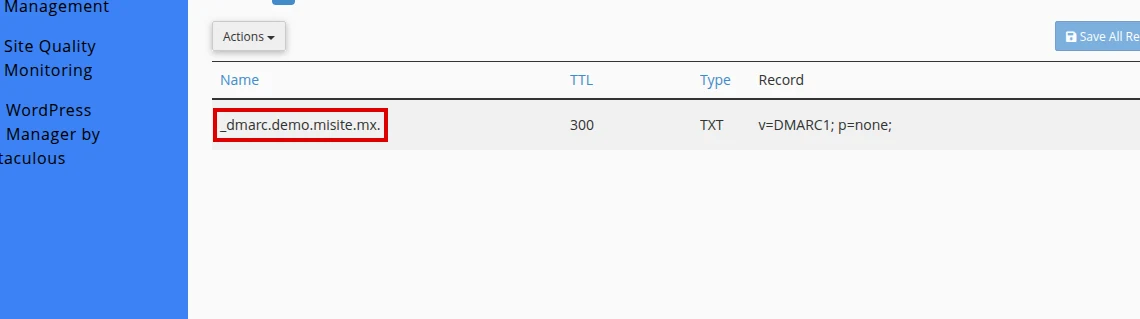
- Inside Manage Zone, use the TXT filter or the Filter by name field to search for
_dmarc. - If you see a record such as
_dmarc.yourdomain.com., do not create another one. Click Edit to update it. - If no DMARC record appears, click Add Record to create a new one.
Add or update the record
- If you are creating a new record, select TXT under Type.
- In Name, enter
_dmarc. If cPanel completes the domain automatically, you’ll see something like_dmarc.yourdomain.com.. - Leave TTL at its default value, or use a lower value if you want the change to apply sooner.
- In Record, enter a safe starter value:
v=DMARC1; p=none; rua=mailto:postmaster@yourdomain.com - Replace
postmaster@yourdomain.comwith an email address you control. - Save the change with Save Record if you are creating a new one, or with Save Record / Save All Records if you are editing an existing row.
How to verify the record
- Wait for propagation, which can take from a few minutes up to 24-48 hours.
- Go back to Zone Editor and confirm the
_dmarcTXT record shows the value you saved. - Use an online DMARC lookup tool, or run
nslookup -type=TXT _dmarc.yourdomain.comfrom your own computer, to confirm the value is published. - Make sure the lookup returns only one DMARC record.
Common errors
- Having more than one DMARC record: only one
_dmarcTXT record should exist. With two, mail servers may ignore them. - Using a
rua=address that doesn’t exist or that you don’t manage. - Forgetting
v=DMARC1;at the start of the value: it’s required and must come first. - Starting with
p=rejectorp=quarantinewithout monitoring first: always begin withp=none. - Editing DNS at the wrong provider when your domain uses external DNS.
- Leaving extra spaces or quotes when pasting the record value.
Recommended reading
Still need help?
If this guide didn’t solve your issue, our team can help you via ticket.