How to register a .mx or .com.mx domain, step by step
Anyone, person or company, can register a .mx or a .com.mx: you don’t need a Mexican tax ID (RFC), incorporation papers or to live in Mexico. Only .edu.mx, .gob.mx, .org.mx and .net.mx ask for documents; check the requirements for each .mx extension if you’re registering one of those.
1. Search for the name
Go to register a .mx domain and type your brand or a keyword in the Name generator.
Click Generate. It tells you right away whether the name is free and suggests variants in .mx, .com.mx and other extensions. The first search can take a few seconds.
Click + Add on the domains you want, then Register domain.
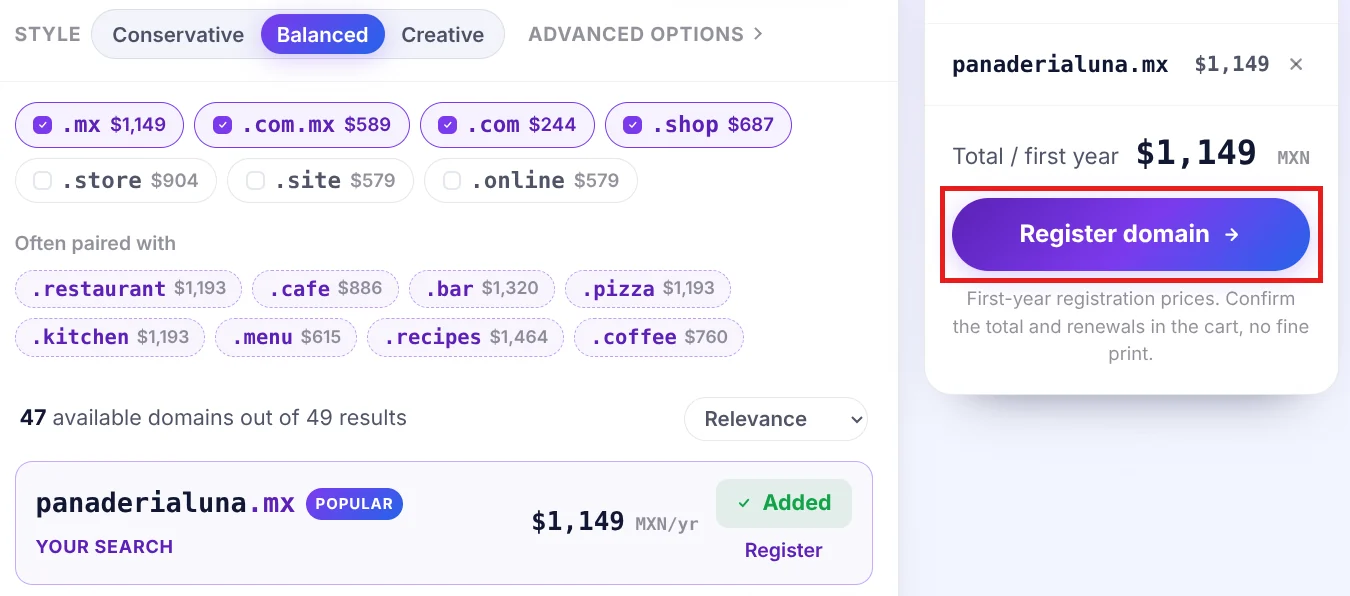
.mx or .com.mx? .mx is shorter and easier to say; .com.mx costs less. If the name matters for your brand, register both and point one at the other.
2. Pick the years and check the total
In the cart you choose the period, from 1 to 3 years. Renewal costs the same as registration, and you see the total before you pay.
3. Enter the right owner
The registrant is the domain’s legal owner. Use the name of the person or company that will use it, not the designer or agency helping you, and an email you actually read: renewal notices go there.
4. Choose the nameservers
- If your hosting is with NubeHost: keep
ns1.nubehost.mxandns2.nubehost.mx. - If your site or email is with another provider: enter the nameservers that provider gave you.
Not sure yet? Leave them as they are. You can change them any time in Domains → My Domains → [your domain] → Nameservers.
5. Pay and wait for activation
When you pay, the registration is sent right away. The domain shows as Active in Domains → My Domains and starts working within a few hours; DNS changes can take up to 24–48 hours to show everywhere.
If you’ll also want email on your domain, the business email plans paid yearly include a .com.mx at no cost.
If it still doesn’t work…
- The name shows as unavailable: someone already owns it. Try the other extension (.mx or .com.mx) or a variant without hyphens.
- The domain is active but your site doesn’t load: it’s almost always the nameservers. Check step 4 or how to change the DNS of a .mx domain.
- None of the above: open a ticket with the domain name.
Recommended reading
Still need help?
If this guide didn’t solve your issue, our team can help you via ticket.